Wednesday, July 6, 2011

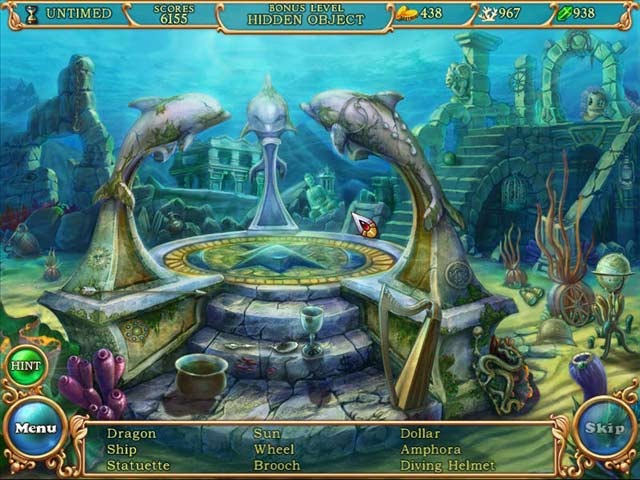
Hidden Wonders of the Depths 3: Atlantis Adventures Game

Download for Free Hidden Wonders of the Depths 3: Atlantis Adventures Game. Normal price this games is $ 6.99 USD. This game available for windows mac and also online version. The Hidden Wonders of the Depths 3 is newest version of this games.

Hidden Wonders of the Depths 3: Atlantis Adventures is Match 3 Games that invites you to travel to the Atlantis world. This is a good puzzle game. Although it not free game, with a Coupon Code we can get the game for free.
Hidden Wonders of the Depths 3

How to get Hidden Wonders of the Depths 3 game for free

  • Open the page “Hidden Wonders of the Depths 3: Atlantis Adventures” Game
    here
  • Click “Buy it” button on the page
    Hidden Wonders of the Depths 1
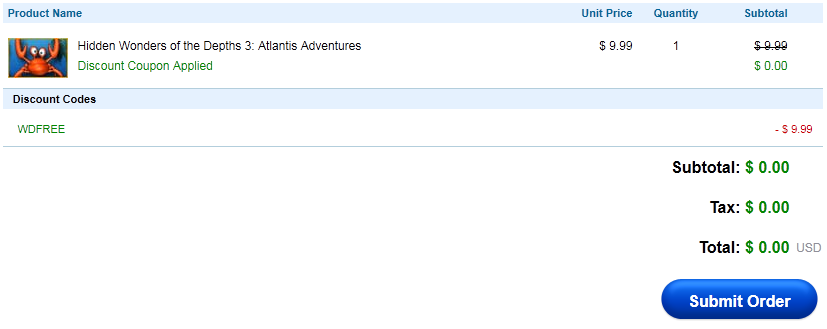
  • Enter the Coupon Code. The Coupon Code is WDFREE then click Apply Code
    Hidden Wonders of the Depths 3
  • Continue to create an account, If already have an account you can login and skip this steps
    Hidden Wonders of the Depths 4
  • Submit your order on the next page
    Hidden Wonders of the Depths 5
  • Click on “Install Game Now” button to download installer of “Hidden Wonders of the Depths 3: Atlantis Adventures” Game
    Hidden Wonders of the Depths 6
  • Install the game in your PC and enjoy the “Hidden Wonders of the Depths 3: Atlantis Adventures” Game in your PC

I don’t know how long active of the Coupon Code for “Hidden Wonders of the Depths 3: Atlantis Adventures”  but when I use the Coupon Code to purchase the game it still active.

Tuesday, June 28, 2011

Integrate Facebook and Twitter to Gmail

You are interest to integrate social services Facebook and Twitter on your Gmail account. By combining the both social services you can check your Facebook status and your twitter easily just only login to your Gmail account. Its mean to integrate the both social services you must install new gadget on your Gmail because there is no default gadgets are available on Gmail for the social service.

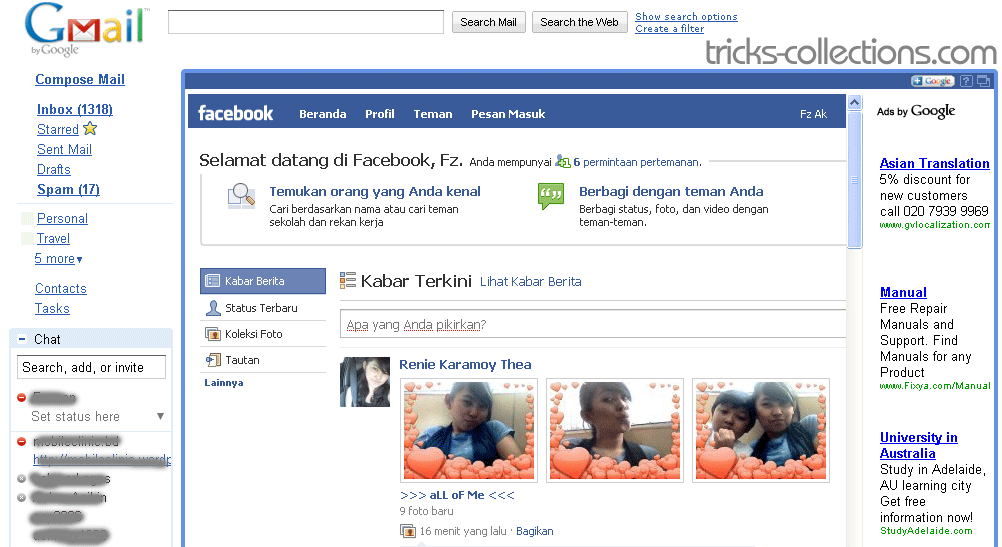
View Facebook status on Gmail

facebook-status-on-Gmail

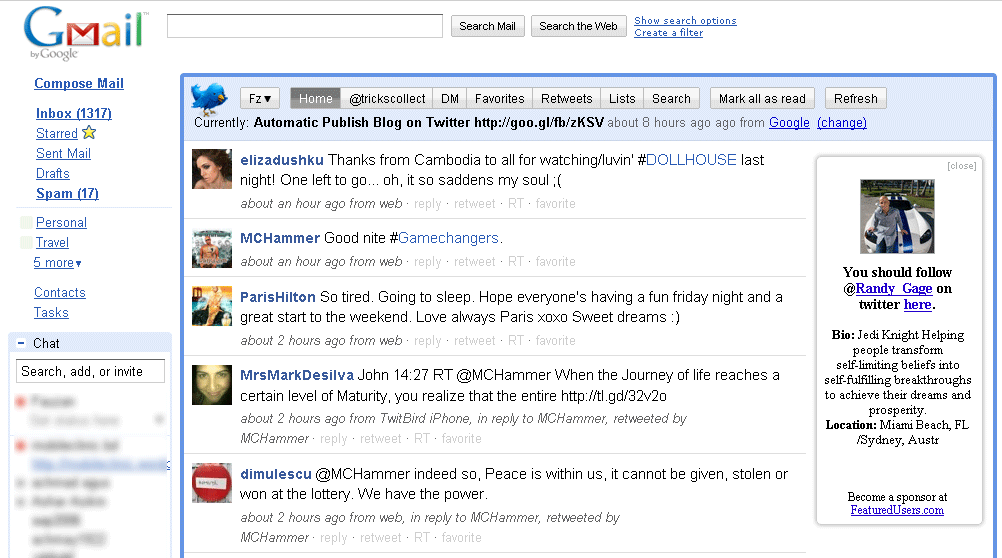
Show twitter tweet on Gmail

twitter-on-Gmail

Here how to integrate Facebook and Twitter to your Gmail:

  • Login to your Gmail account.
  • Click Setting. On the setting sections click Labs tabs.
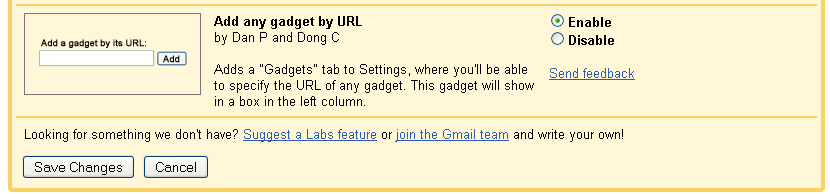
  • Enable “add any gadget by URL”  then “save changes” button to save the setting
    activate add a gadget on gmail
  • Click setting again. Now you will see new tabs named “Gadgets” on setting sections. Click this gadget.
    add a gadget
    Copy this link to gadget form then click add button to install Facebook Gadget:

    http://hosting.gmodules.com/ig/gadgets/file/104971404861070329537/facebook.xml

    And this link to install Twitter on Gmail:

    http://twittergadget.appspot.com/gadget-gmail.xml

Once installations finished you will see new widget in you email account are Twitter and Facebook.

How to see your twitter and Facebook status on Gmail

To view you Facebook status: Click expand on Facebook widget.

To your twitter:

  • Click here link (red rectangle)
    activate twitter on gmail
  • Click “allow button” to allow Gmail accessing your twitter account

How to Delete a Friend, Leave Group and Page on Facebook

Yesterday I chat with a friend he asked “How do I delete a friend from my friends list on my Facebook Account”.  Finally I found an idea to write an article “How to Delete a Friend, leave Group and Page on Facebook”.

Actually to delete a friend, group or page from our Facebook account is very easy you, only clicking leave or Remove link but we often not see the link. If you want to know how to delete a friend, leave Group and Pages on your Facebook account follow the following tips, but if you already know these tips, maybe this article is useless for you.

How to delete a friend from your friend list

  • Click the friend profile that will be deleted from friend list.
  • Click “remove from friend” (Location of the link on the left bottom).
    Remove Friend from Friend list
  • The confirm by clicking “Remove from friend” button

Out of membership of a group

  • Select the Group that will be leaved from your Facebook profile.
    leave a page
  • Click “Leave Group” on the bottom Picture’s profile of the Group.
  • Then Click Remove to confirm.

How to Remove my Account from Fans of a Page

  • Select a page that will be leaved
  • Scroll down your mouse. And you’ll see “remove me from Fans” Link on the left bottom of page. Click this link to remove your account from fans list of the Page.

How to Create Google Adsense Account

Today Google Adsense is the most popular online money maker for website and blog owner. But many blog owners do not know how to create Adsense account. Actually create an Adsense account is very easy, you just require a website or blog with language content that supported by Google Adsense and the website has indexed by Google (suggestion: the website contain minimal 10 pages to get Adsense accepted).

Some important aspects to success creating Google Adsense account you must have a website with self hosting (now Google not accept free domain such as BlogSpot, multiply, and other free domain) and your website not contain content that violates Adsense content guidelines such as Pornography content, hacking or cracking, Gambling, Illicit drugs and other.

Are you ready to create Google Adsense Account? Please the following steps to create an account:

  1. Open Adsense website at this link: https://www.google.com/adsense. After the Adsense page opened click “Sign up now” button.
    1 create adsense account
  2. On the next page you must completed the Adsense registration form.  There three form sections must be completed on this page, here:Website information; enter you website URL, website language (Now Adsense support 32 language)
    2 create adsense account

    Contact Information; Select your account type and Enter the valid information on the form (payee name, address, phone). This data be used to received when you received your payment.
    3 create adsense account

    Policies; you must agree all Adsense policy. Check all option on this section.
    4 create adsense account

    After all data complete click “Submit Information” button

  3. After submit the form Google will review your website and your registration. Usually it needs 1 to 5 days to get your Adsense registration approved or rejected.  Google will send an email to your inbox if your Adsense approved or rejected.

May you interested with other adsense tips: tips to success creating Google adsense account

Can New Google Adsense Looks increase Publisher Revenue?

Google announce a revamped design for three adsense for content that is leaderboard (728×90), medium and large rectangle (300×250, 336×280) size. On the leaderboard, the title, description and URL arranged in rows instead of columns, on medium and large rectangle, now the URL is in the same line with the title. On medium and large rectangle adsense size the new design look more tidy. I don’t know this new adsense design will increase Google adsense publisher revenue or not but in my adsense account, with the new adsense design there no CTR and earnings increased.

Comparison previous AdSense ads designs with new adsense designs

Here the comparison new adsense designs with old adsense designs. Click the picture to get full size picture.

Medium and large rectangle ad sense size

large rectangle adsense unit

medium rectangle adsense unit

Leaderboard adsense size

leaderboard-adsense unit

This new design is testing from Google and that these changes will roll out over the next few weeks. But I read comments from publisher the revenue decreased after using these adsense designs, unfortunately on adsense setting there no option to disable this new adsense look.

Source: new-look-for-adsense-for-content-ad

EarnItUp WordPress Plugin Increase Adsense Earnings by 30%

Do you want get more earning from Adsense?  Install EarnItUp in your wordpress blog. EarnItUp is a free unique wordpress plugin that will increase Google Adsense earnings between 20% and 40% but in my cases only 10%. I don’t know how to EarnItUp work but you can rest assured that EarnItUp makes no modifications to your website or Adsense ads as this is strictly forbidden by Adsense TOS. But now EarnItUp plugin available only for Wordpress blog platform (with selft hosting). For other blog platform may be available on the next version of EarnItUp plugin.

earnitup-slogan

How to Install EarnItUp in your Wordpress Blog? It easy, there are only 3 steps on getting more Adsense money.

  1. Download the EarnItUp Plugin. You can download the plugin from the link below
  2. Upload EarnItUp.php to your wp-content/plugins folder and activate the plugin
  3. Setting the plugin by Go to Settings-> EarnItUp Registration and register the plugin. Because EarnItUp it is a free product but requires registration in order to be used. Once registered, you will start earning 30% more Adsense earning.

Get more info and download EarnItUp open the EarnItUp website here: http://earnitup.com/.

How to Success Creating Google Adsense Account

Maybe you are interested in making money with your blog using Google Adsense. Read the following tips on how to successfully register Google Adsense account. At this time to create Google Adsense account you must have a website or Blog with dot com domain. If you already have a dot com domain its does not guarantee you can success creating Google Adsense account. After collecting a lot of information from friends and various sources now I will give you tips how to success create a Google Adsense account.

The first tip, the primary content of your website or Blog must be supported by Google Adsense; if not you don’t create Adsense account because it is very important.

The second tip, don’t create Google Adsense account if your blog or website have little content. Update your website or blog to have at least 10 contents, if more is better.

The third tip, you must change ownership of your domain name by your name because frequently asked questions by Google Adsense when creating Google Adsense account is: “whether is your submitted website is your website? Or similar question” If you buy the domain through your hosting owner and you have access to configure your domain you can change the domain owner by yourself but if you do not have enough knowledge about this, please ask your friend or your hosting administrator.

The fourth tip, add “Meta author” on your blog. This is usually very rarely used the most frequently used is Meta keywords and Meta description.

With the above tips, possible your application request will be accepted by Google. If rejected you can apply again after some time.

How to Sell Ad Space on Your Website Easily

Have ad space or banner advertising space on your blog or website and difficulty to sell the ad space on your website, you can use buy sell ad space broker to sell your ad space. But the min if you join banner ad network, the ad network will take few percent of advertising money generated by your ad space but the plus if join banner ad network you can recruit advertiser, keep track of your earning and control  ad placement easily.

In order the ad space that you sell quickly sold you must have lot traffic on your website so the advertiser will be interested to buy your ad space. Another advantage, more traffic on your website the price of ad space on your website will be higher. Sell ad space is a great way to get fixed income from you website/blog.

Here are some websites that provide service to sell ad space on your website:

A. BuySellAds.com

If you want to sell ad space through BuySellAds.com you must have a nice website or blog with greater that 100K impression per month. BuySellAds.com only accepted English website content and the content on the website no contain illegal content such as porn, gambling and other illegal content.

The domain that registered on BuySellAds.com must your own domain and this website does not accept BlogSpot blogging platform. If you interest to sell your ad space on your blog open here: buysellads.com

B. Advertisespace.Com

Unlike BuySellAds.com, Advertisespace.Com only has three banner sizes: 125×125, 260×125 and 88×31 banner size. Advertisespace.Com accepted all blog/website categories. Interest to sell ad space on this website open here (ref).

C. Performancingads.Com

The plus on Performancingads.Com network that is accept BlogSpot domain. If you have a BlogSpot blog with huge traffic you must try to sell ad space on this website. The bad, Performancingads.Com only have 125×125 banner size. Starts sell ad space on this website click this link (ref).

I hope this post will help you to convert your traffic into money. :D

3 Best Tips for Google Adsense to Get Higher CTR and Make More Money with Adsense

google-adsense-more-money-tipsGoogle Adsense is Cost per Click advertising based. To get more money from google Adsense we must get more clicks on ads or increase Google Adsense CTR (click through ratio). CTR is a measure of how often users click on your Adsense. Some of the tips is my experiment with Google Adsense and on my experiment the following tips can increase CTR up to 2%-4%.

Are you ready to make more money with Google Adsense? Please follow the following tips.

Tips 1: Use section targeting on your website

With Adsense section targeting will make the show Adsense more relevant to your website content. To implement section targeting, you’ll need to add a set of special HTML comment tags to your website/blog code.

The HTML tags to emphasize a page section take the following format:


Content

To view about more section targeting click this section targeting help .

Tips 2: Match the color and font of your Adsense

This tip will blended Adsense as links similar to your site. Blending Adsense with your sites color and font profile helps to identify them not as ads. Here how to match the Adsense color and font similar to your website/blog

  • Login to Adsense account
  • Click “Adsense Setup” tab then “manage Adsense”. Click  “Edit Ad Settings” on the individual ads to be edited.
  • Set font family, font Size, color and background of Adsense similar to your website.
    google adsense blending option
  • Save your setting

Tips 3: Get the best Google Adsense Placement for CTR

For this tip I will show with image to put Adsense on your blog

Placement for homepage

placement-for-homepage

Placement for single content

placement-for-single-conten

You may also see Google Heatmap

google-heatmap

I hope these tips help to increase your Adsense CTR earning. Good luck and make more money with Adsense.

Western Union Now Available for Indonesia Publisher

On 7 Feb 2009 I receive email from Adsense team with subject “Western Union Now Available in Indonesia”. With Western Union you can receive your Adsense payments in cash is quick, easy, and free. Best of all, you’ll no longer need to wait for checks to arrive in the mail or to clear at the bank. Payments by Western Union are currently only available to individual payee names and not to businesses and maximal earning is US$ 2000.

How do I sign up to receive my AdSense payments by Western Union?

If you would like to receive your earnings by Western Union Quick Cash, please complete the following steps.

  1. Sign in to your account at www.google.com/adsense.
  2. Visit the My Account tab.
  3. Click the ‘edit’ link adjacent to the ‘Payment Details’ header.
  4. Select the Western Union Quick Cash radio button.
  5. Click ‘Continue’.
  6. Click ‘Save Changes’ to save your payment type.

Once you’ve signed up for the Western Union Quick Cash payment method, you can learn more about how to pick up your Western Union payment here: https://www.google.com/adsense/support/bin/answer.py?answer=65789 .

Increase Adsense Earning with Google Affiliate network

After Google disable referral program on Adsense, a few day ago Google released Google Affiliate network (GAN) and it similar with Google referral program. Like referral program, GAN based cost-per-action (CPA) you can earn revenue after your visitor click the ads and buy the advertisement product.

Unlike Google referral than using JavaScript, on Google Affiliate Network using HTML code so it not make your website loading speed slow. Google Affiliate Network (GAN) supported in all countries supported by Adsense but if need high conversion rate majority your website/blog visitor must from US because the majority of advertisers in the GAN are currently focused on the US market.

Google Affiliate Network

How to Register Google Affiliate Network

  1. Click here to Sign up for a Google Affiliate Network account
  2. Click “Yes, I have an Adsense Account” button then enter your Adsense email and Adsense publisher ID Then click “submit & continue”
  3. On the next page enter about your website and promotional methods then submit the form.
  4. You can receive email notification from “affiliate-noreply@google.com” and wait typically within 24 hours to know you application approved or rejected.

Note: If you’ve earned at least the minimum commission on Google Affiliate Network, you’ll receive payments through your Google AdSense account

Source info: http://adsense.blogspot.com/2010/09/supplement-your-adsense-earnings-with.html

How to Create Google Adsense Account

Today Google Adsense is the most popular online money maker for website and blog owner. But many blog owners do not know how to create Adsense account. Actually create an Adsense account is very easy, you just require a website or blog with language content that supported by Google Adsense and the website has indexed by Google (suggestion: the website contain minimal 10 pages to get Adsense accepted).

Some important aspects to success creating Google Adsense account you must have a website with self hosting (now Google not accept free domain such as BlogSpot, multiply, and other free domain) and your website not contain content that violates Adsense content guidelines such as Pornography content, hacking or cracking, Gambling, Illicit drugs and other.

Are you ready to create Google Adsense Account? Please the following steps to create an account:

  1. Open Adsense website at this link: https://www.google.com/adsense. After the Adsense page opened click “Sign up now” button.
    1 create adsense account
  2. On the next page you must completed the Adsense registration form.  There three form sections must be completed on this page, here:Website information; enter you website URL, website language (Now Adsense support 32 language)
    2 create adsense account

    Contact Information; Select your account type and Enter the valid information on the form (payee name, address, phone). This data be used to received when you received your payment.
    3 create adsense account

    Policies; you must agree all Adsense policy. Check all option on this section.
    4 create adsense account

    After all data complete click “Submit Information” button

  3. After submit the form Google will review your website and your registration. Usually it needs 1 to 5 days to get your Adsense registration approved or rejected.  Google will send an email to your inbox if your Adsense approved or rejected.

May you interested with other adsense tips: tips to success creating Google adsense account

Download MachStudio Pro Free Full Version

MachStudio Pro is a 3D art and animation program DAZ studio 4 like, but I think this program is like 3ds Max. I don’t know which is better, MachStudio Pro is DAZ studio because I not tried the both software. The latest version of MachStudio Pro is version 2 and the MachStudio Pro available for free.

MachStudio Pro is software from studio GPU that revolutionizes the 3D visualization production pipeline to help user explore and refine your creative options in real-time in full cinematic quality. MachStudio Pro having innovative real-time rendering engine, non-linear 3D environment and it features-rich

MachStudio Pro
The Benefits of MachStudio Pro

  • Deliver real-time rendering on your desktop, with MachStudio Pro you say good-bye to expensive render farms that found on other 3D software.
  • Provides revolutionary workflow, this features allow user camera, lightning, ambient and other in real time.
  • Seamless interoperability with most CG software such as Autodesk Maya and 3ds Max, etc.
  • Allow user to render an any resolution and format (e.g. 1080P, 720P, 16:9, 4:3, NTSC, PAL and even 2K and beyond).
  • Generate higher quality CGI results for less time and money for free

Sample MachStudio Pro  Animation Pipeline

MachStudio Pro Animation Pipeline

MachStudio Pro 2 can be downloaded for free here: Download MachStudio Pro (504.36 MB). This software can be installed in Microsoft Windows 7 and Windows Vista Business on 32 bit or 64 bit windows version.

Free AVG Internet Security 2011 Serial Number with 3 Month License Active

Actually this Free AVG Internet Security 2011 Serial number promo is old promo but the promo still active. The AVG 2011 license in this promo is active for 3 month.  If your 3-month AVG license has expired, you can get new serial number for AVG IS 2011 from the Zima promo pages because I expect that this promo page will be active for a long time.

Although the promo is in Polish language but don’t worry because the serial number from the Zima promo can be used in AVG internet security 2011 English version (I’ve tested the serial number).

AVG Internet Security is easy to install and use. On may-august 2010 this internet security software was rated number 1 in threat detection by AV-Test Org.

AVG Internet Security 2011 - 3 month

How to Get Free AVG Internet Security 2011 Serial Number

  • This AVH promo is winter promo by Zima. To get the license open this promo page: http://www.avg.pl/ZimaZAVG
    AVG IS Promo 3 months - form
  • Fill out the form on the promo page. You just fill the field marked with blue, other field is optional. Enter “Zima z AVG” in Has?o z czasopisma field.
  • Submit the form. you’ll receive email confirmation for the subscription.
  • A few minutes after clicked the confirmation link you’ll receive AVG 2011 license number and download link for AVG internet security 2011 but the software in the email is Polish version. To download the English version open here: AVG 2011 offline installer
  • Use the serial number to activate the AVG IS 2011 software.

Besides getting AVG internet security 2011 serial number with 3 month license active, in the promo also you can get  opportunity to purchase a two-year license with a 20% discount.

USB Immunizer to Prevent Autorun Virus Infecting Your PC

BitDefender USB Immunizer is a program panda vaccine like. The Bitdefender software will disable all auto-run function in the USB drive to prevent autorun virus infecting your PC. As we know, for years, many autorun virus such as Conficker (Downadup), VHD, etc. spread and infected most computer in the world.

The BitDefender USB Immunizer allows user to immunize their USB storage device or SD card against infections with autorun-based computer viruses/malware. Remarkably, according to the information that available in the USB website, this software will prevent malware create autorun.inf file even your USB storage plugged into an infected computer.

Unlike USB Vaccine that there are no option to enable autorun features, in the USB Immunizer you can do it easily by clicking On or Off button.

image

Bitdefender USB Immunizer Features

  • Multilingual interface support.
  • Support for a wider range of windows file systems: FAT12, FAT16, FAT32, exFAT and NTFS
  • Completely new protection algorithm for the autorun.inf file
  • Option to automatically immunize flash drives that are unprotected

Download USB Immunizer and keep your computer safe from autorun virus. This software can be used in windows XP, vista and windows 7.

Check also other free software to disable autorun viruses in USB drive. software to block malware spreading through USB drive

Giveaway: Nokia Video Converter Pro + Genuine License

Wonderfox Nokia Video Converter Factory Pro has upgraded and now in cooperation with WonderFox Soft, tricks-collections.com giving away again free genuine license for Nokia Video Converter Pro. Like the previous version, in this giveaway also provides unlimited license number for this blog reader.

Nokia Video converter pro is useful software to convert any video (almost al video formats supported) to video and audio Nokia device supported. Nokia video converter priced $19.95. This Wonderfox software is easy to use software and it support more than 100 Nokia device.

In the Nokia video converter pro version you can get more features such as editing video, add special effect to converted video and more.

Nokia video converter

Giveaway Nokia Video Converter Pro with Genuine License Key

  1. Open giveaway page here: Nokia Video Converter Giveaway
  2. Click on “Free Download” to download the software
  3. Click “Get Free License”  link to get license key Nokia video converter factory pro and follow the process.

On the giveaway page you can also get discount 50% off for WonderFox DVD Ripper and HD Video Converter Factory Pro

CCleaner Download: The Newest Version Released

CCleaner is free software to clean PC by removing unnecessary file and registry entry from windows system. With this software you can make your computer work faster and more secure. CCleaner also provides easy to use interface and it lightweight.

Besides removing unnecessary files (also called junk files) in the PC, this software also can be used to remove cache, cookies, history on popular browser. CCleaner supports Internet Explorer, Firefox, Google Chrome, Opera and Safari.

This utility software also have a module to check and repair the system registry for errors, incorrect or outdated “keys” that caused by installing and uninstalling the software in the PC.

CCleaner-3.07

New and Improve feature In the new version of CCleaner 3.07:

  • Added the ability to control and clean the Flash Player SOL configuration files
  • Added the ability to clean Safari Icon History
  • Added the ability to clean Windows Elevated Diagnostics
  • Added the ability to cleanse Software Kantaris Media Player, KMPlayer, Orbit Downloader, Pando, Sandboxie and Snagit
  • Improved work with files XFire, Real Player, Macromedia Shockwave 10 and 11, LOG-Windows files
  • Improved work with files, Google Chrome and Opera
  • Improved purification in the “Recent Documents” (Recent Documents)
  • Improved work with System Registry
  • Fixed minor bugs in localizations

Download the new version CCleaner 3.07. The software can be downloaded here: CCleaner download

Panda Antivirus Pro 2012 Free License 3 Months Active

Panda Antivirus Pro 2012 Free License 3 Months Active. Actually this Panda Antivirus Pro 2012 Free License is old promo but panda security updated the version to the latest 2012 version but the license given in this promo is still active for 3 month. Regular price of this antivirus is US $40.99 for one license.

The new version of Panda Antivirus Pro 2012 provides maximum protection for your PC with minimum impact to PC performance. It mean this antivirus software will protect your PC against  viruses, spyware, rootkits and hackers without slowdown you PC. There is no new features in this Panda antivirus 2012 but panda security has improved a few features.

Panda Antivirus Pro 2012 Promo

How to Get Panda Antivirus Pro 2012 for Free with 3 Months License Active

  1. Open Panda Antivirus Pro 2012 promotion page here: Panda Security  promotions page
  2. Click on “Download FREE” button to download offline installer of Panda Antivirus Pro 2012. The offline installer size is 69.64 MB.
  3. Install the software in your PC then activate then software online to 3 months service for free. done

The Improved Features in Panda Antivirus Pro 2012

  • Panda SafeCD, clean all types of malware in your computer using Panda safe CD. This features is useful if you cannot start windows normally.
  • Personal Firewall, to blocks intruders and hackers.
  • Collective Intelligence, a new threat is identified and in a matter of seconds all Panda Security’s customers worldwide are protected.
  • Protection your PC against all types known and unknown of viruses and threats.
  • Panda Safe Browser (Sandboxing). Panda Safe Browser is plus features in panda antivirus pro 2012. With this feature you still safe when browsing and opening a website.

Panda Antivirus Pro 2012 on windows 32 bits and 64 bits version and can be installed in windows version: Windows 7, Windows Vista and Windows XP.

Free Download Angry Birds Game for Android Device

On the past I’ve posted about angry birds online. If you have an android device, you can download it from amazon store for free and enjoy the angry bird game in your gadget. There are two version of angry birds game can be downloaded; Angry Birds Seasons Free and Angry Birds Free.

As we know, the Angry Birds game released in 2009 now this game get more 50 millions download and available various version of this game in internet. The newest version of this game is Angry Birds Rio. Angry Birds game is about Birds vs. Pigs.


Here the Free Download Angry Birds Game for Android Device

A. Angry Birds Seasons Free

Angry Birds Seasons Free

Angry Birds season is released to celebrate the holidays. In this game version, you can play through over 100 special holiday-themed levels with a mixture of strategy, skill, and brute force. The theme that found in this game is Halloween, Christmas, Valentine’s Day, St. Patrick’s Day or Easter.

B. Angry Birds Free

Angry Birds Free

On the Angry Birds Free there are over 240 levels of challenging pig fortifications to defeat. Its also a great game that you must have in your android device.

How to Get the Both Angry Birds Mentioned Above for Free

  1. Open this link http://www.amazon.com/gp/product/B004SJ3BCI to download Angry Birds free
    And This link http://www.amazon.com/gp/product/B004SJ3AXI to download Angry Birds Season
  2. On the top right form, enter your mobile number or your email ID then follow the steps to download the games.

Note: This Angry Birds free version is ad-supported. it mean will there advertisements appear in the game.  To remove the advertisements you must purchase the game for $0.99

You might also like this post: Download Angry Birds Rio Movie Wallpapers and Themes for Windows

Panda Antivirus Pro 2012 Free License Active for 6 Month

On the past I’ve posted info promo Panda Antivirus Pro 2012 License Number. On Facebook I found promo Panda Antivirus Pro 2012 with more long time active license. This promo license code is from Panda USA and the license in this giveaway promo active for 6 month.

Panda Antivirus Pro 2012  is newest version of antivirus software from Panda Lab. The newest version Panda software come with new interface and this software also come with a few new and improve features, for more info about this features please read my previous post about Panda Antivirus Pro 2012: Panda Antivirus pro 2012.

Interests to try Panda Antivirus Pro 2012  you can download the software with 6 month license active on Panda USA Facebook fan page.

Panda Antivirus Pro 2012 6 Month Promo

How to Obtain Free Panda Antivirus Pro 2012 with 6 Month License Active

  1. Open Panda USA promo on Facebook here: Facebook PandaUSA
  2. Click like button to become a fan and then click “Download it now!” to download the installer.
  3. Install the Panda software in your PC and activate online to obtain 6 month license active for this Panda Antivirus Pro 2012.

You do not have a Facebook account, you can still get Panda Antivirus Pro 2012 with 6 Month License Active by download the offline installer here: AP12_Facebook.exe